Exam records & signing
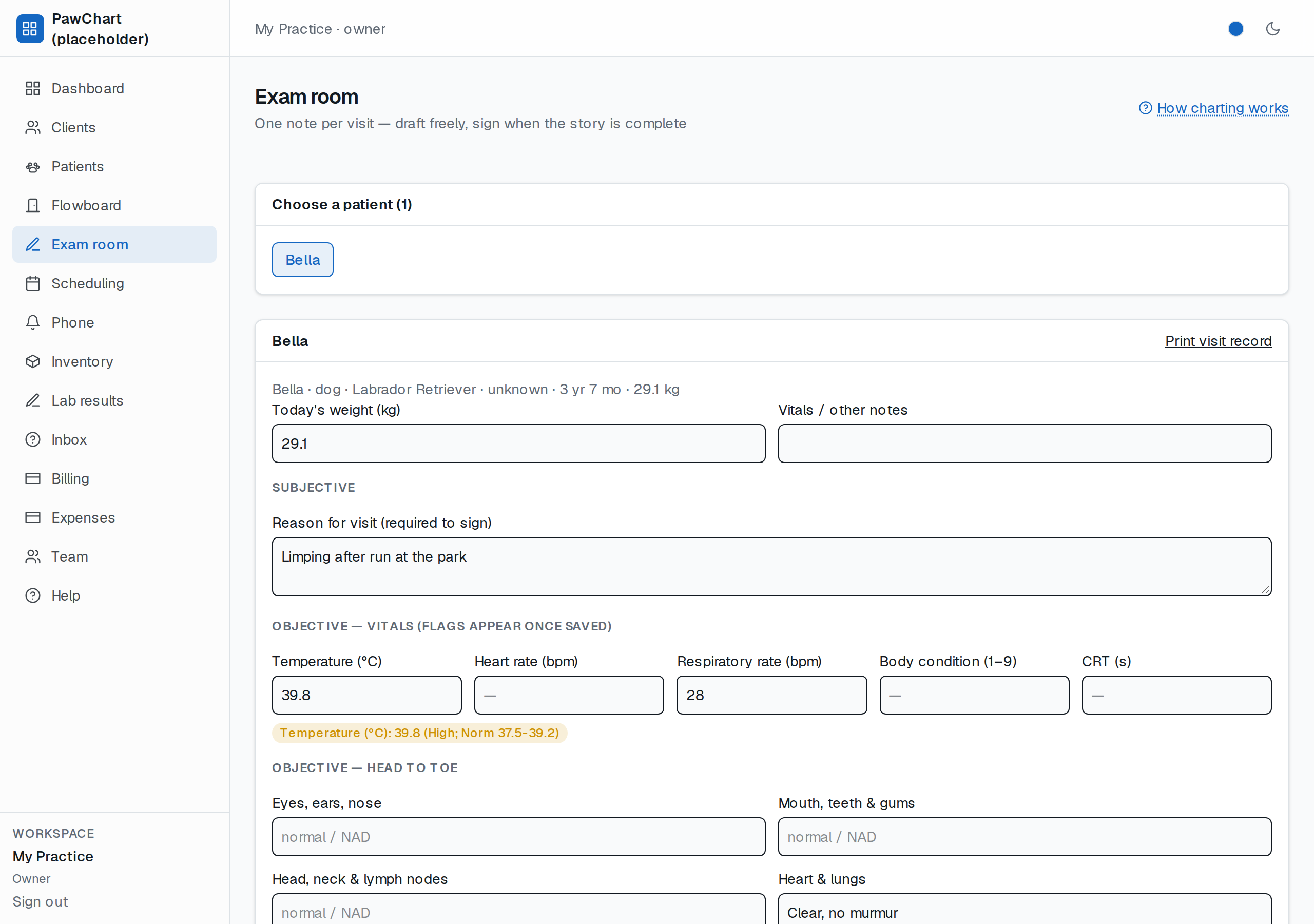
1. Exam room → click the patient. The header (name, species, breed, sex, age, weight) is generated from the patient record — you never type signalment. If the front desk already checked the patient in on the Flowboard, you are charting into that same visit record — one record per visit, not two.
2. Fill in reason for visit, the vitals, the head-to-toe rows, exam findings, assessment, plan. Update today's weight — it becomes the patient's current weight and is also kept per visit (growth curves later).
3. Save draft as often as you like — nothing is locked until you sign.
4. Sign note requires *reason for visit*, *assessment* and *plan*. Signed notes get a signed badge and stop editing (corrections = new note for now; amendment chains are on the roadmap).
5. Every visit's notes appear under Chart history with draft/signed status, and the card header links Print visit record — the whole visit as one page (see Visit record).
6. Treatments — what you gave during the visit goes on the same screen: one entry charts the dose, takes it out of stock and puts the charge on the visit's invoice (see Treatments). Prescriptions sit beside them: draft while you think, issue when it is safe to hand over (see Prescriptions).
Why sign? A signed note is the legal record of what you found and planned. Draft = still thinking.
Structured vitals (flagged against species norms)
Temperature (°C), heart rate, respiratory rate, body condition (1–9) and CRT are separate fields, not a sentence. Save the draft and anything outside the resting-adult norm for that species gets a badge, e.g. `Temperature (°C): 40.1 (high; norm 37.5-39.2)`. Blank fields are blank — never a zero.
The ranges are sensible defaults for a general practice, not your formulary or your anaesthesia norms, and they do not adjust for age, breed, pregnancy or stress. A badge is a prompt to look again; the vet decides. They live in one file (`lib/domain/vet-vitals.ts`), so per-clinic ranges are a small change, not a rewrite.
Per-system exam rows
The Objective — head to toe grid is one row per body system for that species (mouth/teeth and lymph nodes for dogs, gut motility and hocks for rabbits, keel and crop for birds, hooves and trot for horses). Leave a row blank and it is simply not recorded; typed rows print in order on the visit record. The free-text Exam findings box is still there for the narrative.
Species-aware templates (nothing gets missed)
Open the exam room on a patient and the Exam findings and Plan boxes arrive pre-filled with the head-to-toe checklist that species actually gets examined by — different for dogs, cats, birds, reptiles, rabbits, exotic mammals and horses (teeth first for rabbits, hooves and trot for horses, keel and crop for birds). It's a starting point, not a straitjacket: edit or delete anything. The checklist is only pre-filled for new exams — returning charts open with their own history.