Treatments
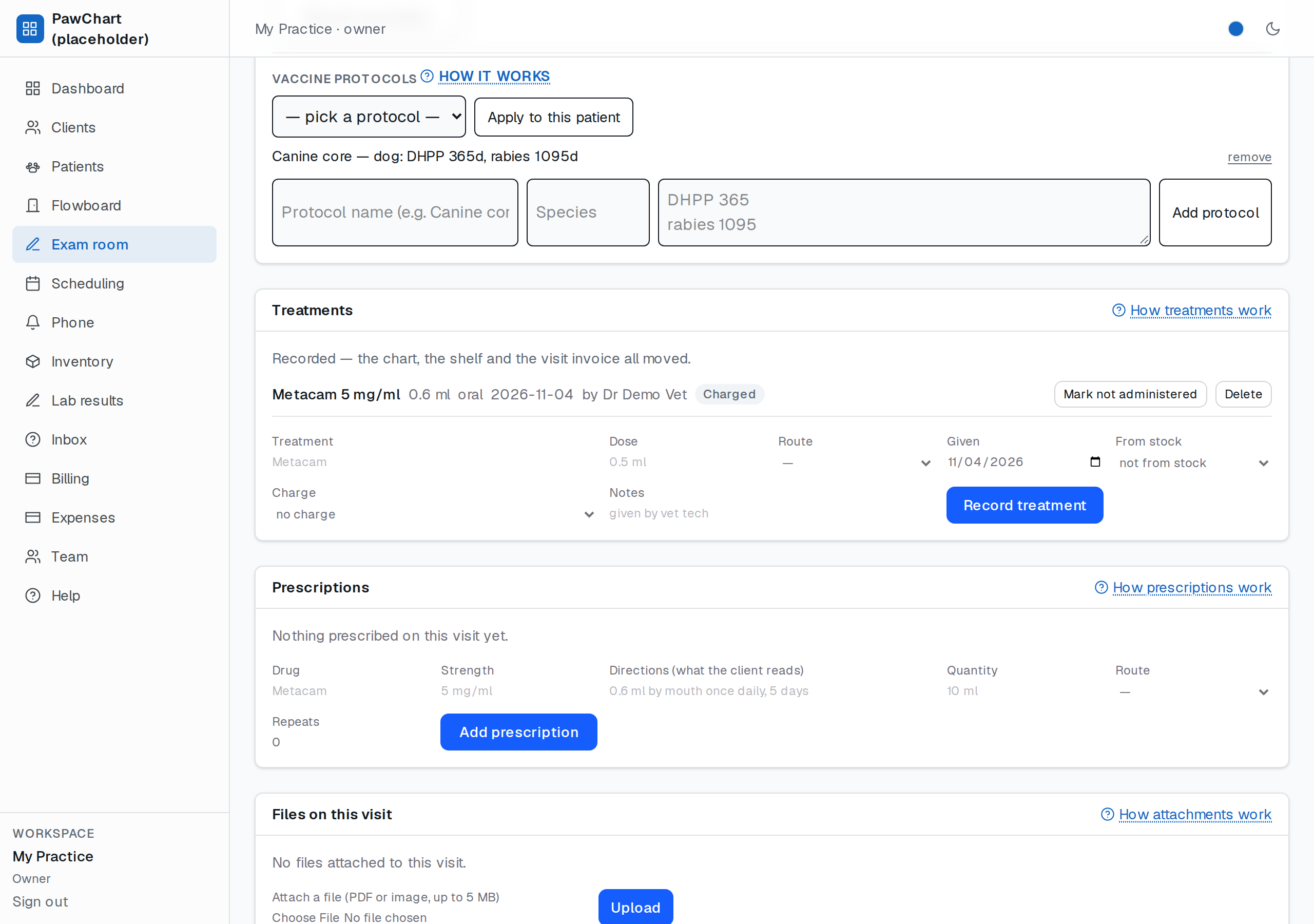
A treatment is anything you do to the patient that isn't an exam or a vaccine: an injection, a topical, a nail trim, flushing an ear. You record it once, and three things happen — the visit chart shows what was given and who gave it, the dose comes out of stock, and the charge lands on the visit's invoice.
Getting there
Open the visit (Flowboard → Record, or the chart's Print visit record link back to the visit) and use the Treatments card. It only appears while a visit is open, because a treatment belongs to a visit — that is what makes the invoice line and the follow-up work later.
What one entry does
- Chart — the name, dose, route and date join the visit, with your name as "by …" so the record shows who administered it.
- Stock — pick an item in From stock and one unit leaves the shelf as the entry saves. The dose is not saved at all if the bin is empty; you get sent back with a "out of stock" note rather than a phantom treatment.
- Charge — pick a price-list item in Charge and it is added to the visit's invoice at the list price, with tax worked out the same way as every other line. If the visit has no invoice yet, one is created and linked to the appointment. Leaving it on no charge is how a dose given under a plan or a demo is recorded without billing it.
The invoice's total is always recomputed from its lines — never from what the form remembered — so reversing a treatment cannot leave a stale total behind.
Routes
The route dropdown is the same list prescriptions will use: oral, subcutaneous, intravenous, intramuscular, intradermal, topical, otic, ophthalmic, nasal, inhaled, rectal. It is deliberately plain language: the invoice line reads *Metacam (0.6 ml, oral)*, which is what the client sees on their bill.
When a dose was not actually given
Use Mark not administered on the row. The treatment stays in the chart — the client's file should say it was prescribed and then not given — but the stock unit goes back to the shelf and the invoice line is removed, with the invoice recalculated and its status re-derived.
Deleting a treatment does the same reversal and then removes the row. Re-giving a reversed dose takes another unit from stock; if the bin is empty it refuses, rather than issuing the dose you never drew up.
On the printed visit record
Anything recorded on the visit prints in its Treatments given section, including reversed ones with their *not administered* marker, so the document matches the file.
Limits, honestly
- One unit per entry. A course of three injections is three entries; there is no quantity field or dosing schedule (twice daily × 10 days) yet — that belongs with prescriptions.
- No weight-based dose calculator: you type the dose you drew up.
- No withdrawal periods or controlled-drug registers yet (both matter for some species and jurisdictions).
- Charges ride on the same invoice as the appointment; you cannot split a treatment onto a separate client-facing invoice yet.
Related
- Exam records & signing — the note the treatment is recorded against.
- Visit record — what the client walks out with.
- Inventory — restocking what the treatment took off the shelf.
- Billing — the invoice the charge landed on.