Prescriptions
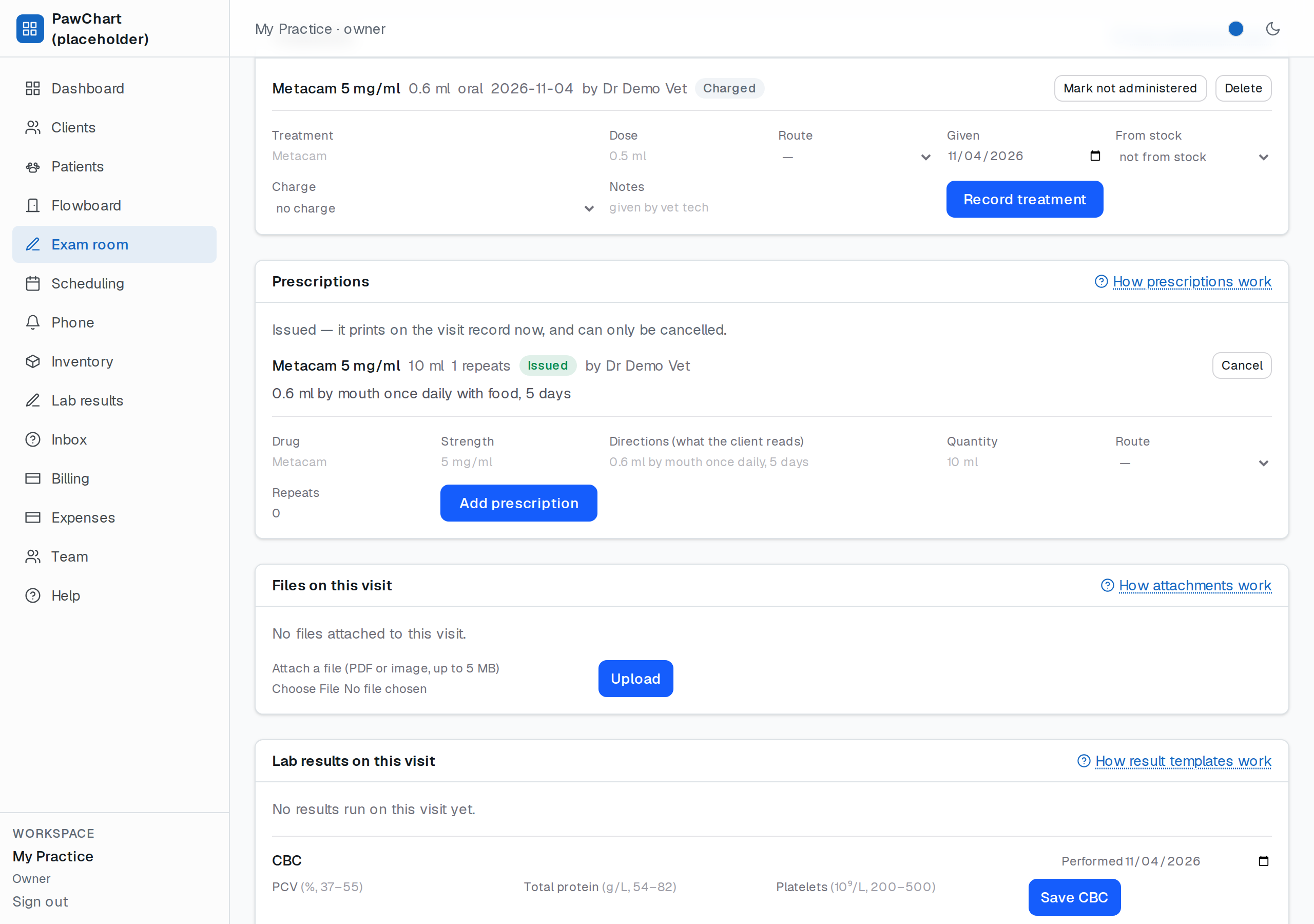
A prescription starts as a draft in the exam room and becomes a document when you Issue it. The split is deliberate: while you are still deciding — checking the weight, arguing with yourself about the dose — nothing you type can reach the client, and nothing half-finished prints on the visit record.
Getting there
Open the visit (Flowboard → Record) and use the Prescriptions card. Like treatments, a prescription belongs to a visit, which is what makes it appear on the printed record and keeps the patient's medication history in date order.
Draft
Fill in what you have. Only the drug name is required, because a draft is allowed to be unfinished — a note to yourself at 2am with the directions still blank. Drafts:
- can be edited as often as you like (Edit draft under the row),
- are never shown on the printed visit record,
- can be thrown away with Delete.
Issue
Issue is the moment the prescription becomes the thing the client walks out with, so it refuses an incomplete page: drug, directions and quantity must be filled in. The directions field is the sig — write it the way you would say it to the client at the desk ("0.6 ml by mouth once daily with food, 5 days"), because that sentence is what they read on the print-out and what the after-hours locum reads at 3am.
Once issued:
- it prints in the Prescriptions section of the visit record, with who issued it,
- it can no longer be edited,
- it can only be Cancelled — the row stays in the chart with a *cancelled* marker, because "we prescribed it then called it back" is part of the medical record.
To change an issued prescription, cancel it and write a new one. The two rows together are the audit trail.
Repeats and route
Repeats is a plain count (how many times the client may ask for more) and route is the same list used by treatments — oral, subcutaneous, topical, otic and the rest. Quantity is free text for now ("10 ml", "30 tablets"); it becomes a counted, costed field when the products and dispensing side lands.
Limits, honestly
- No formulary yet: nothing checks whether you already have that drug in stock, and nothing knows the species' default dose. The drug library and interaction warnings arrive with the products work.
- No dispensing step: issuing does not take anything off the shelf or add a dispensing fee to the invoice. Charges for what you hand over come with product stock (see Inventory for what is counted today).
- No compounding instructions or withdrawal periods (meat/milk/egg withholding for food animals) yet.
- Refills are recorded as a number, not a workflow — there is no client-facing refill request yet.
Related
- Treatments — what was given in the room, charged as it went.
- Visit record — the page the issued script prints on.
- Exam records & signing — the note this visit's decisions live in.